ChatGPT, Claude and Gemini all have projects now. What changes when one project works with models from all three
ChatGPT Projects, Claude Projects and Gemini notebooks compared on files, instructions, memory and sharing, and what a multi-model project adds.
"Space replaces Library for accounts with access; your existing Projects remain separate."
The sentence appears in OpenAI's ChatGPT release notes for 29 September 2026, under a new feature called Space, which gathers pages, files and related work for Pro, Business and Enterprise accounts. The second half is the point. ChatGPT now has two places to keep material for ongoing work, and the older one, Projects, is staying put. Anthropic's Claude has Projects. Google's help centre says notebooks in the Gemini app are for organising your projects. Projects give you a place to keep files and instructions, so you don't have to paste them into every new chat. They have become standard in AI chat apps.
We compare what a project does in each of the three, using each company's own help pages as we read them on 19 October 2026. All three share one design choice: each project answers with one company's models. We make MultiChats, where a folder's files work with models from many companies. Keep that in mind when weighing our view.
What a project holds in each app
OpenAI's help page, "Projects in ChatGPT", says: "Projects keep related chats, files, and instructions together." You can add PDFs, spreadsheets, documents, images or pasted text, and the number of files depends on the plan: 5 per project on Free, 25 on Go and Plus, 40 on Pro, Business, Enterprise and Edu. Instructions go in Project settings, and OpenAI says they "apply only within that project and override your global custom instructions." Each project runs on either default memory or project-only memory. With project-only memory, chats can draw on other conversations in the same project and nothing outside it. All plans, including Free, offer sharing, with chat or edit access for the people you invite.
Anthropic's help centre describes Claude's projects as "self-contained workspaces with their own chat histories and knowledge bases." They are open to every account, and free accounts can create up to five. You upload documents to the project knowledge and add instructions with Set project instructions. Anthropic allows 30 MB per file and an unlimited number of files, "but total content must fit within Claude's context window". On paid plans (Pro, Max, Team and Enterprise), Claude switches to retrieval when a project's knowledge nears that limit. Each project keeps its own memory. Sharing a project with other people is limited to Team and Enterprise plans.
Google's version is the notebook. Notebooks come from Gemini Notebook, a separate Google app, and show up in the Gemini app once Gemini Notebook is connected. Google says that happens automatically in most regions, while in the European Economic Area "you'll need to connect it manually". A notebook holds sources (files from your device or Google Drive, web links, pasted text) and its own instructions, which are the same in both apps. Google's plan page lists 50 sources per notebook on the free Standard tier, 100 on Plus, 300 on Pro and 500 or 600 on the two Ultra plans, all marked "Subject to Change". Notebook memory uses past chats in that notebook when Keep Activity is on. Notebooks that contain Gemini chats "are private and cannot be shared"; shared notebooks live in Gemini Notebook itself.
MultiChats puts the leading AI models in one app. Try it free
The four, checked on 19 October 2026
The rows below come from the vendor pages named above and, for MultiChats, from our own production code. Vendor limits change without notice; these are a dated snapshot.
MultiChats folders | ChatGPT Projects | Claude Projects | Gemini notebooks | |
|---|---|---|---|---|
Who can use it | Folders on every plan; project files on Pro and Pro+ (web and mobile apps) | Signed-in users, Free included | Every plan; free accounts up to five projects | Signed-in users, rolling out gradually; manual connection in the EEA |
Files | Pro: 20 files, about 75,000 words. Pro+: 100 files, about 150,000 words | 5 per project on Free, 25 on Go and Plus, 40 on Pro and business plans | 30 MB per file; unlimited count within the context window; retrieval on paid plans | 50 to 600 sources per notebook, by plan |
Instructions | No per-folder box: global custom instructions, a file, or folder memories | Per project, overriding global instructions | Per project | Per notebook |
Memory | Folder memories (paid); chats do not read each other | Default or project-only; project chats can reference each other | Separate memory per project | Uses past notebook chats with Keep Activity on |
Sharing | None | All plans, with chat or edit access | Team and Enterprise only | Not for notebooks containing Gemini chats |
Models that answer | Whichever model you pick: OpenAI, Anthropic, Google, Mistral, xAI, DeepSeek and others | OpenAI's | Anthropic's | Google's |
The models row shows the difference.
What all three have in common
ChatGPT, Claude and Gemini each keep the project inside one company's app, and every answer comes from that company's models. That matters in the third or fourth week of a long piece of work, which is exactly what projects are for.
Take someone putting together a planning appeal for a house extension. The project holds the council's decision letter, the planning officer's report, a neighbour's objection, a dozen photos of the site and a draft of the appeal statement. Over a month, that person will ask very different things of the same material: read a dense 40-page report and pull out the policies it relies on, turn an angry first draft into something calm and specific, check whether the objection's claims match the photos, and tighten the final text. No one can tell you in advance which model will suit which job. To find out, ask more than one model with the same files in front of each.
A single-company project offers several models, all from the same company. For a second opinion from another company's model, you can paste the relevant parts into another app. But you must decide what matters before that model sees the material. Or you can rebuild the project there: upload every file again and rewrite the instructions. The chat history and project memory stay in the first app. Both work once. Few people do either every few days, so they stop asking.
Another cost comes from model changes. AI companies replace their models every few months, and the model you chose in September may be renamed or retired by November. When the project and model come as a pair, a change you did not ask for reaches your project with it. We think the project should belong to the work, and the model should be something you choose question by question.
How the same idea works in MultiChats
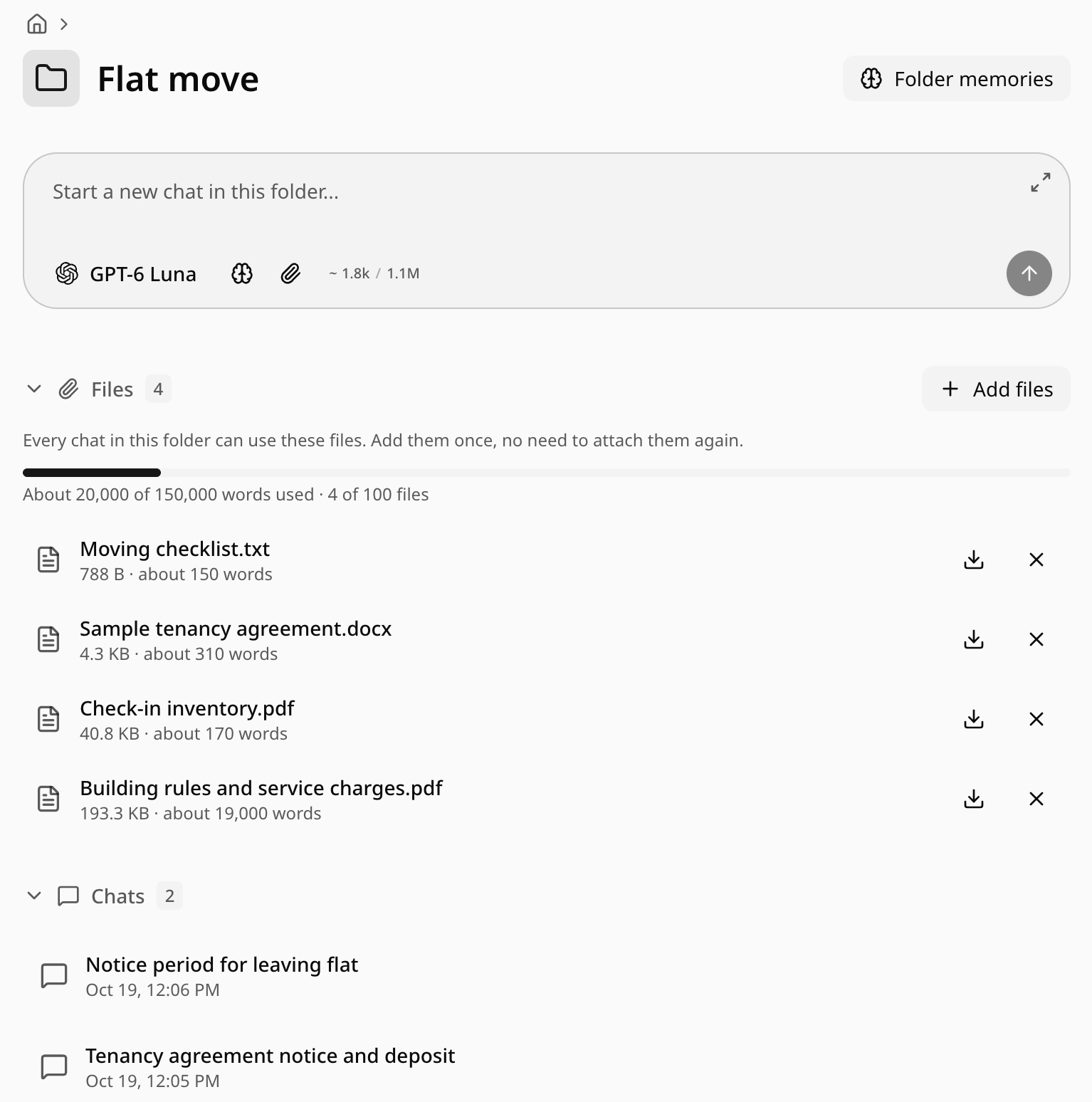
In MultiChats a project is a folder in the sidebar. Open the folder and its page has a Files section with the line "Every chat in this folder can use these files. Add them once, no need to attach them again." Add PDFs, documents, spreadsheets, text files or images. A bar shows how much of your allowance they use. In any chat inside the folder, the message box shows a small chip, such as "3 project files", so you can see they are in play. Files need Pro or Pro+, and they work on the website and in the iPhone and Android apps.
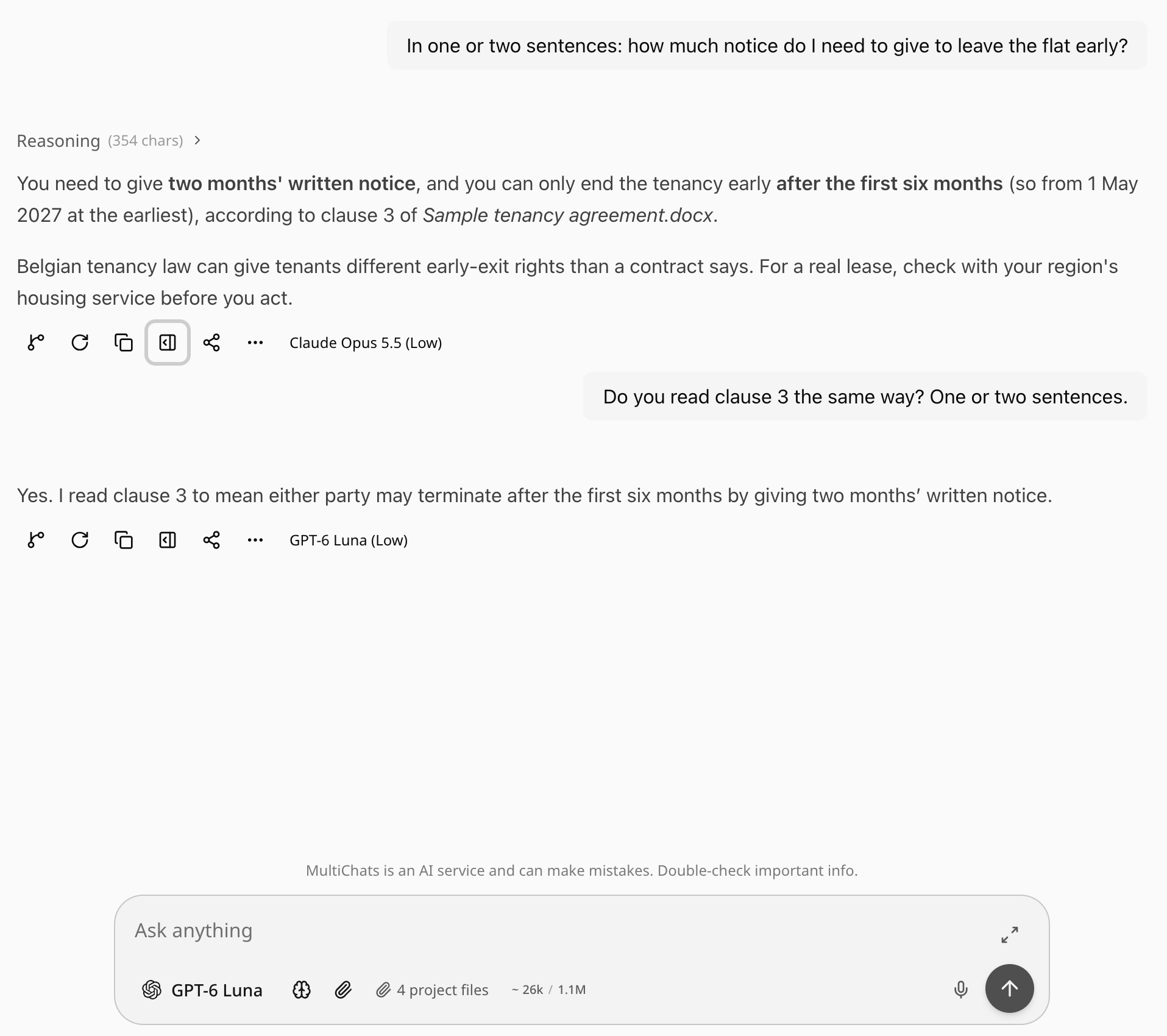
Changing models shows the difference. The files go with each message to whichever model you have picked for that message. Draft the appeal with Claude Opus 5.5, switch the model picker to GPT-6 Luna for the plain-English rewrite, then to Gemini 3.8 Flash or Mistral Large 4 to check the result, and each of them reads the same files and the same conversation. Each answer carries the name of the model that wrote it, so a month later you can still see who said what. If you would rather keep the first answer and hear another model separately, Try Again with a different model opens a new chat, and that new chat stays in the same folder, so it has the files too.
When a project is larger than a model can take in at once, the model receives the list of files and looks up the parts it needs. Models without those look-up tools receive the files that fit and a note naming the unseen files. They can then tell you their answer may depend on those files. A photo in Files only reaches models that can read images; a model that cannot is told an image is there. If you switch to a model whose context window cannot hold the conversation so far, the app tells you "This chat is too long for" that model and offers Switch back. For very long documents, our piece on which AI handles the longest documents goes further.
There is no instruction box per folder. Custom instructions under Settings, Account, Profile in Personal preferences apply to every model in every chat. For instructions that belong to one project, the simplest route is a short text file in Files, which every model then reads. On a paid plan, you can attach saved memories to the folder with Folder memories. When a chat gets long, Summarize and start fresh with Save to this folder turns it into a folder memory the next chat can use.
Choosing, as of October 2026
The three single-company versions share the same ingredients: files, instructions, some form of memory, and, with conditions, sharing. They differ in limits and in who gets what on which plan, and those details will keep moving. What does not move is the boundary: a ChatGPT project answers with OpenAI's models, a Claude project with Anthropic's, a Gemini notebook with Google's.
So the useful question is how often you want a second opinion from a different company's model. If it is every few days, a single-company project means pasting or rebuilding each time. A MultiChats folder was built for that case: the files stay put, and the model picker spans every company we carry.
Whichever app you use, one habit makes a project easier to move later: keep a copy of your instructions in a plain text file inside the project. Files travel between apps. Settings boxes stay where you typed them.