Why DeepSeek says the server is busy and how to keep working
How to check a DeepSeek outage, when to retry your prompt, and why DeepSeek in MultiChats can still answer when the website is busy.
Why does DeepSeek say “The server is busy” when all you sent was a short question? Start by checking which app showed the message, because the DeepSeek website and MultiChats send requests along different routes.
What does “The server is busy” actually mean?
It means the service could not handle your request at that moment. On chat.deepseek.com, one possible cause is a traffic spike. The site can still load and show old conversations while the service that produces new replies is struggling. It can also be a wider fault, and the message alone gives you no way to tell which.
Start with the scope of the problem. If one attempt fails and the same question works a few minutes later, you may have hit a short interruption. If even a short message in a new chat keeps failing, check chat status before spending time rewriting your request. A message that names a file size limit or tells you when an allowance resets gives you a different lead.
MultiChats puts the leading AI models in one app. Try it free
How can I tell if DeepSeek is down?
Check the Chat Service entry on the official DeepSeek status page and look for an incident covering the time your request failed. DeepSeek tracks chat, uploads and its own model services separately. Match the report to what failed. If you could send text but an attachment failed, look at the File Upload Service entry.
There are examples of both patterns in DeepSeek's incident history. On 14 November 2026 it recorded a 22-minute web chat slowdown. On 7 November it listed a partial interruption spanning web chat and several other components. Use the affected components and timestamps to see whether an incident lines up with what you experienced.
The MultiChats DeepSeek status page gives you another place to check the provider feed. During the first few minutes of a problem, either page can be green while you are seeing failures. Give the page time to catch up if short test messages keep failing.
Should I refresh, resend or just wait?
Copy your prompt, wait a few minutes and retry once. If you had an attachment ready, keep a note of which file it was. Refresh the page after saving your draft if the chat screen itself is stuck.
A short text-only message in a fresh chat can narrow it down. If that works, try the original question in smaller pieces, or attach just the part of the file you need. A failure on the short message too is a reason to move on to the status check. If a reply is visibly still arriving, let it finish before sending a duplicate. You can also try the phone app or a different connection if the status page is quiet and the website continues to hang.
Why might DeepSeek work in MultiChats when its own site is busy?
MultiChats uses a separate hosting route for DeepSeek. The DeepSeek website receives its own chat traffic and can slow down when many people ask for replies at once. In MultiChats, we send DeepSeek requests through OpenRouter, which can use only the vetted US or EU third-party hosts on our approved list. Those hosts run DeepSeek models themselves. MultiChats never routes those requests to DeepSeek's own API.
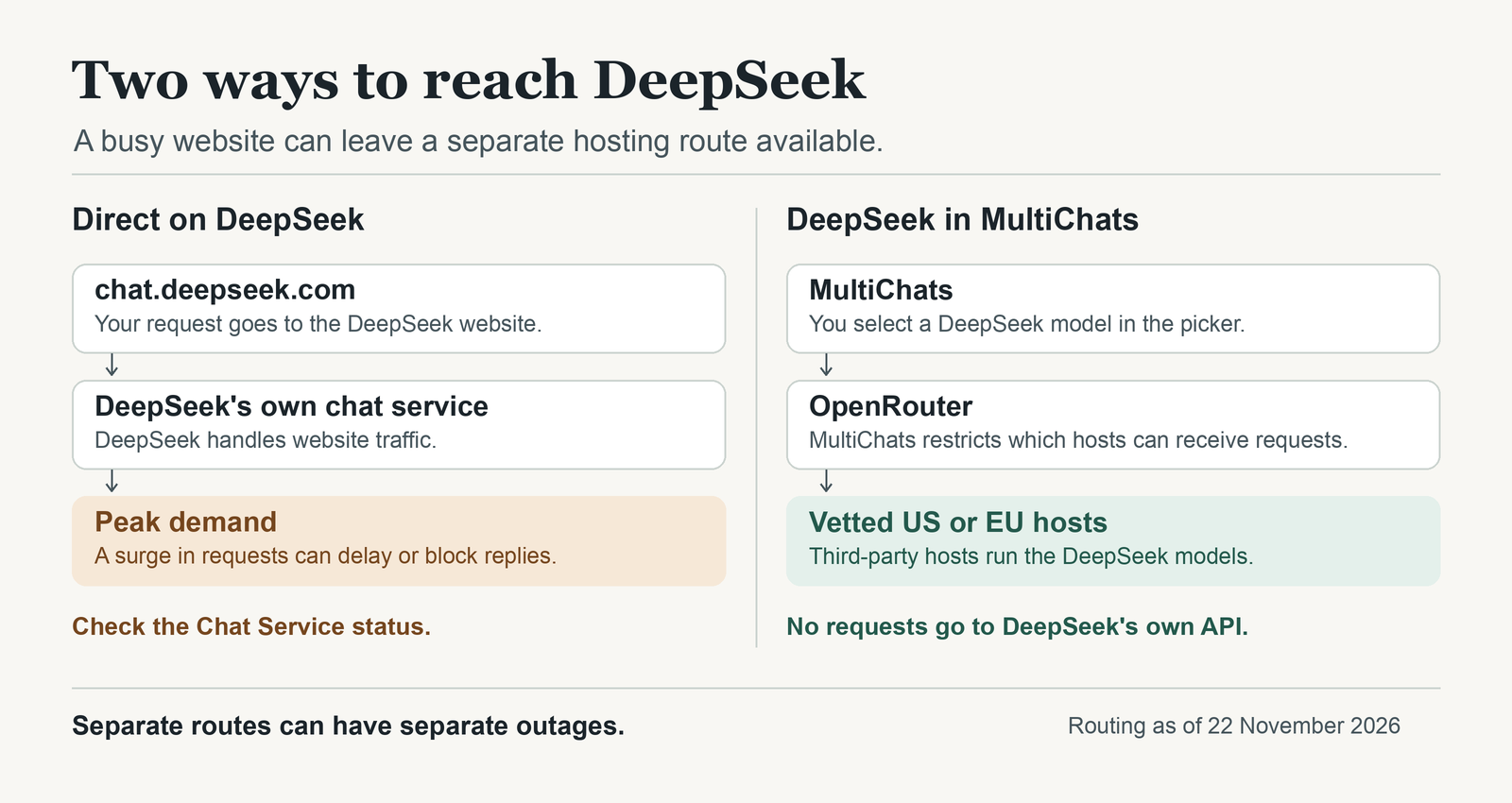
DeepSeek publishes models that other companies can run on their own servers. Those servers have their own capacity. A rush of requests on DeepSeek's website therefore says little about the spare capacity of the hosts serving the model in MultiChats. A problem on a third-party host can also leave DeepSeek's website unaffected.
There are limits to what a separate route can do. An approved host can run out of capacity, and OpenRouter or MultiChats can have a fault of its own. When no approved host can answer, the request can fail. The routing restriction still applies.
Which DeepSeek model should I pick in MultiChats?
Pick DeepSeek V4 Flash for a text question, or try DeepSeek V4.1 Flash when your question needs an image. As of 22 November 2026, V4 Flash is in the free model picker. V4.1 Flash is a paid model and the picker shows its current build as DeepSeek V4.1 Flash 1017. Both can work with text. The newer model accepts image uploads in MultiChats.
Say you are working out which parts came with a second-hand bookcase. Paste the parts list and either model can turn it into a checklist. If you have a photo of the inventory card, choose V4.1 Flash and check any part numbers against the photo. If the photo is blurry, type out the numbers yourself. For a current replacement-parts list, check the manufacturer's site or pick a model with web search. Web search is off for both DeepSeek entries in MultiChats.
Will switching bring my DeepSeek chat with me?
You'll need to copy the relevant details if you're moving from chat.deepseek.com to MultiChats. Open a new conversation and bring over the question and the information needed to answer it.
A short handover is usually enough. If you were working through the bookcase inventory, paste the model name, the list you already checked and the part you still need to identify. Reattach the relevant file if the model you choose can read it. Save any partial answer separately so you can see which parts were already done.
Within MultiChats itself, you can use the model picker in the same thread when a request fails. If your next question depends on an attachment, check the new model accepts that file type before sending it.
What if both places are giving me errors?
Check whether a short request works with a different model in MultiChats. If it does, you have a way to finish the task while the DeepSeek routes recover. If several models fail, check MultiChats status and try another connection or device. Two DeepSeek errors by themselves tell you very little about whether the same fault caused both.
If you need to report a recurring failure, note the app, the model and the time of the last attempt. Include the wording of the error and say whether a simple text message also failed. That gives support enough to start looking without needing the private contents of your chat.