Custom instructions in MultiChats: tell every AI model how you like your answers
Write your custom instructions once and every model you pick in MultiChats gets them. Where they live, what to write and how to check.
Do you find yourself typing "keep it short, and use metric units" at the top of chat after chat? You can save requests like that once in MultiChats, and every model you pick will receive them with each message you send.
Where do I set custom instructions in MultiChats?
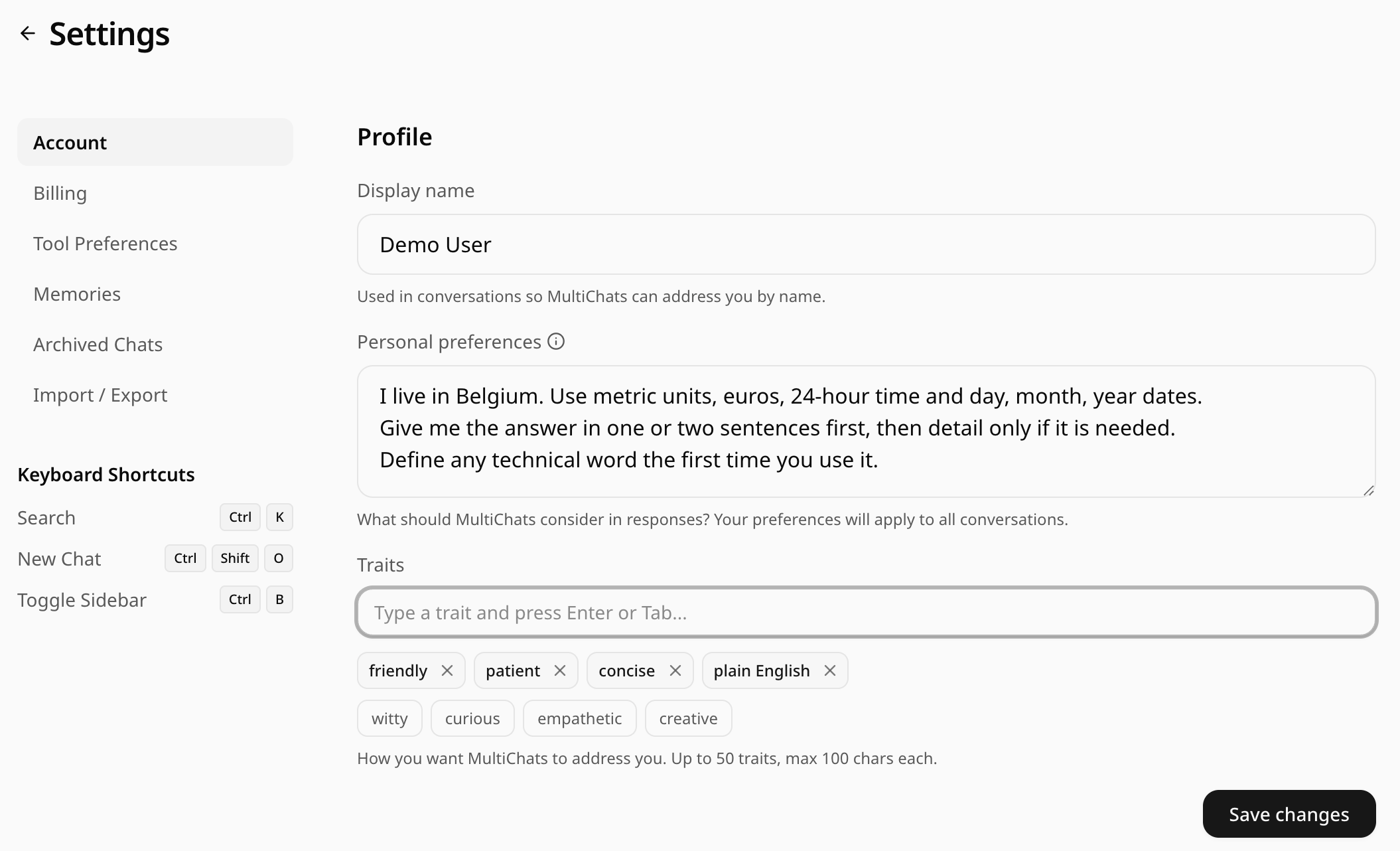
On the website, click your name at the bottom of the sidebar, choose Settings and stay on the Account tab. The first section, Profile, has three fields: Display name, Personal preferences and Traits. Fill in what you want and press Save changes. A short "Profile updated" message confirms it.
On the iPhone and Android apps, open the side menu, tap your name to reach your profile, then tap Personalization. The box labelled "Anything else the AI should know" holds the same text as Personal preferences on the website, so what you save on one device shows up on the other. Traits sit underneath, with Save changes at the bottom.
Want to follow along as you read? Open MultiChats
Do I have to pay for this?
No. Personal preferences and traits work on every plan, the free one included. You do need to be signed in, because a guest has no settings page to save them to.
What should I actually write in there?
Write down what you would otherwise keep repeating. Use plain sentences, as if briefing a helpful stranger. The box takes up to 5,000 characters, though a short, clear paragraph is easier for a model to follow.
Useful requests include:
Reading level: "Explain things as you would to a curious adult with no background in the subject. Define any technical word the first time you use it."
Units and formats: "I live in Belgium. Use metric units, euros, 24-hour time and day, month, year dates."
Length: "Give me the answer in one or two sentences first, then detail only if it is needed."
Tone: "Be warm and direct. Skip compliments about my questions."
Your situation: "I work night shifts, so suggestions for meals, sleep and exercise need to fit odd hours."
What to avoid: "No bullet points for short answers. Do not recommend products unless I ask."
Language: "Answer in Dutch, even when I write in English."
MultiChats asks every model to reply in the language of your latest message unless you request otherwise, so spell out a language preference as clearly as that. If a model slips back, repeat the request in your message.
Leave out anything you would not want sent with every message, such as account numbers, passwords or health details that matter for one conversation only.
What are traits, and how are they different from preferences?
Traits are short qualities you want in the replies, a word or two each. The app suggests seven, from friendly to patient. On the website, type your own and press Enter or Tab; on the phone, type it and tap the plus button. You can add up to 50, each up to 100 characters, though a handful works better than a crowd.
The model gets your traits as a list of qualities to keep in mind and your preferences as instructions in your own words. Use traits for the general flavour and the box for anything specific.
Will every model follow them the same way?
Not always. Every model receives the same text, but each follows it in its own way. Your instructions travel with each message to whichever model you have picked, so switching from a Claude model to a Gemini one mid-chat carries them over without you doing anything. The model determines how closely it follows them: one may keep tightly to a word limit while another drifts back to its usual length after a few long replies.
Write requests you could check, such as "under 150 words unless I ask for more"; a mood such as "be brief-ish" leaves the model guessing. If one model keeps ignoring a line, see how another handles the same question by branching the chat to a second model. The branch opens as a new thread, and your instructions go with it.
How is this different from memories?
Personal preferences apply to every chat, all the time, whereas memories are notes you decide where to use. Each memory has a title and its own text, and you can include it in all new chats, pick it for one chat, or add it to a folder so new chats there start with it. Memories are a Pro and Pro+ feature; personal preferences and traits are free.
Put how you like your answers in Personal preferences, and facts that only matter to one part of your life (the kitchen renovation, the course you are taking) in memories.
Does the AI get to know my name?
Only once you have saved it yourself. If you signed in with Google or Apple, the name from that account is kept out of every model's instructions until you confirm it, and the web settings page tells you so under Display name: "Until you save it here, MultiChats won't pass your name to any model."
On the website, Save changes saves Display name along with everything else, so saving your preferences there also confirms your name, and models may address you by it from then on. If you would rather they did not, use a nickname, or save your preferences from the phone's Personalization screen, which leaves your name alone. The web form needs at least two characters in Display name before it will save.
How can I tell they are working?
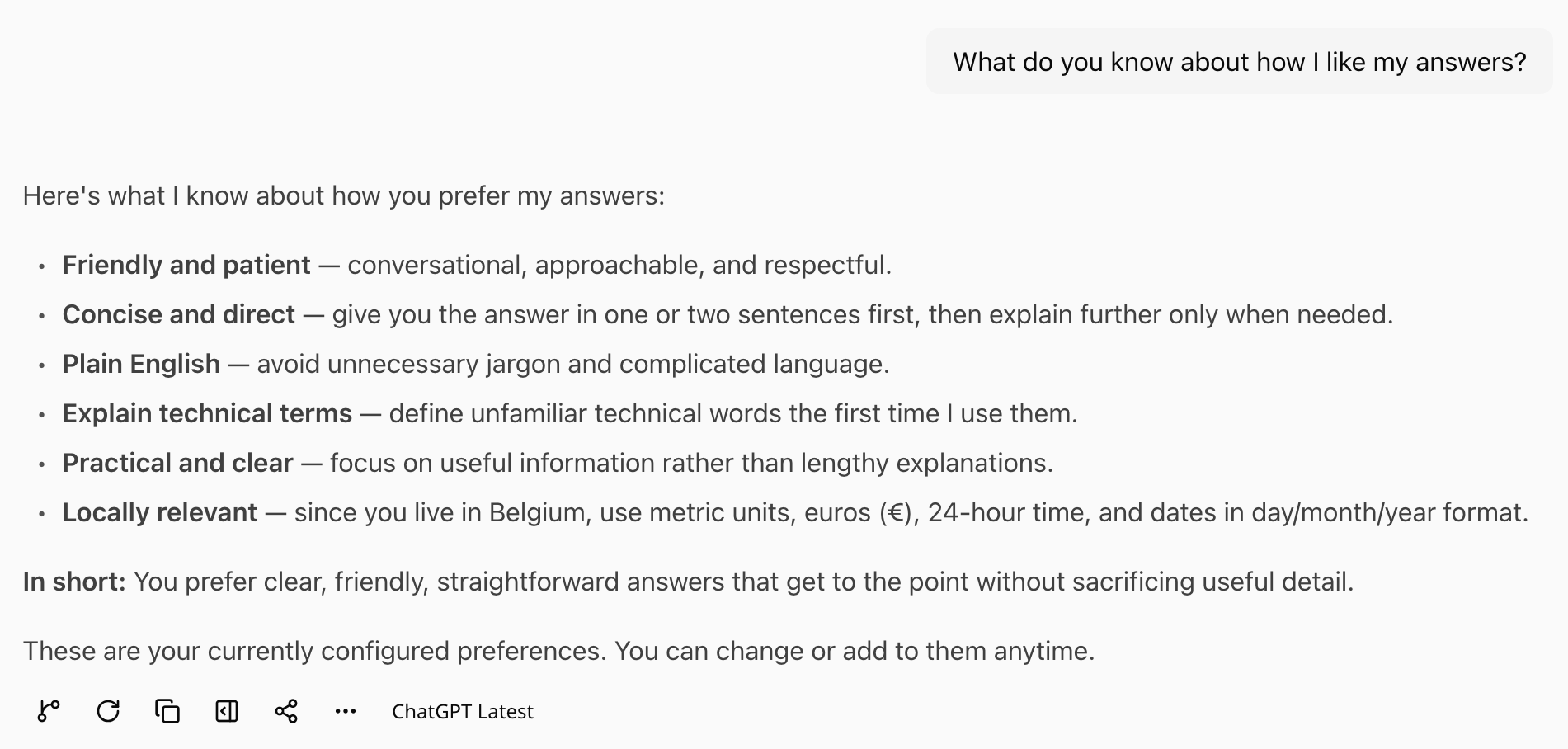
Ask something your instructions should shape. Asked for metric units? Ask for a recipe. Asked for short answers? Ask something that usually gets a long one. You can also ask outright: "What do you know about how I like my answers?" The model can see your preferences and traits, so it should be able to repeat them back.
Changes apply from the next message you send, in any chat, including conversations you started before you saved them. Replies that were already written stay as they were.
Do they come along into temporary chats?
Yes. A temporary chat leaves your saved memories out, but your preferences and traits are sent with every message there as well, as our guide to keeping an AI chat private and temporary explains.
How do I switch them off?
Empty the fields and save; there is no separate on and off switch. Delete the text in Personal preferences, remove each trait with the small cross beside it, and press Save changes, on the website or in Personalization on the phone. From your next message, models no longer receive them. If you only want a break, copy the text somewhere safe first.
Can I bring my instructions over from ChatGPT or Claude?
Yes, by copying and pasting. According to each company's help pages, checked on 19 October 2026, ChatGPT keeps its version in a field called Custom Instructions, under Personalization in its web settings, and Claude's settings have a section called Instructions for Claude. Copy your text into Personal preferences and save. OpenAI's page gives ChatGPT a limit of 1,500 or 5,000 characters depending on the plan, and MultiChats takes 5,000 on every plan, so whatever you saved there will fit.
Read it through before saving: lines that name ChatGPT or Claude, or refer to features only those apps have, can confuse the other models you use here.
What those assistants have remembered about you is a separate matter. On Pro and Pro+, the Import from AI button on the website, in Settings under Memories, turns it into MultiChats memories.